
- Posted on
- • Other Electronics
Wifi LED CPM Display for Displaying Radmon.org Station Count
- Author
-
-

- User
- Mr Blinky
- Posts by this author
- Posts by this author
-
[Updated: 22/12/2021]
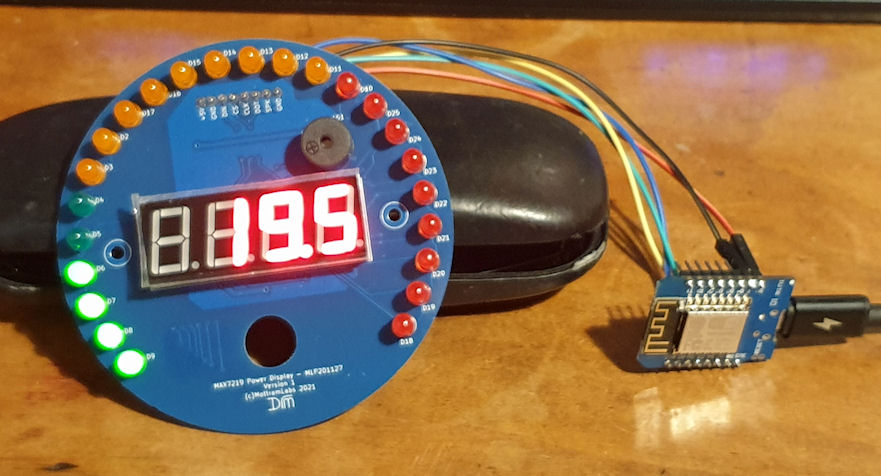
Its the first day of holidays and I'm bored already.... So I cooked up a neat wifi/wemos d1 mini/arduino/LED display for displaying a station's current CPM.
It works by simply connecting to one's Wi-Fi and then goes to the URL, pulls the data, strips the first space and everything afterwards then converts what is left to a float (the CPM count from the start of the string) and displays it. The bar graph LEDs are mapped from 0 to 100 CPM at full scale deflection, but the 7 segment display will display up to 999.9 CPM, and after that will just display - - - - lol. It's super easy to build (5 wires and no more!) and cost about a tenner (Ten Great Britain Pounds Sterling) in all. The display is actually for another project, but I'm waiting on parts for that so thought I would learn how the display works and made this! I think I'll keep it and house it in something nice. Maybe a vintage round desk clock case or something. I am struggling with the speaker on the display and it just sounds like crap when I try to use it. It may only be compatible with an Arduino, not the Wemos d1 mini. The pictures are less than desirable, but meh.... You get the idea! ☺️
I have added a feature to display in uSv/hr instead of CPM - Selectable in code.
I wrote a very simple PHP page that generates a random number between 10 and 100 for testing purposes. It emulates the 'last reading' page from Radmon.org so can be used in testing playing with the string also. (For parsing etc.) You can use it here: http://www.blinkyslab.co.uk/radmon/random_cpm.php and source below.
The display module is from www.mottramlabs.com (shop on ebay) and the MCU is just a Wemos D1 Mini R2.
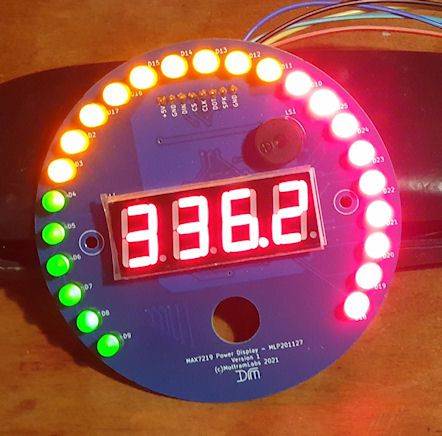
This is reading 336.2 CPM (fudged, so it will show the full bar)
A couple of Youtubes of the display in action. This is using a random CPM generator mentioned above.
Without decimal:
With decimal:
Arduino code:
/*
LED display with bar graph for displaying Radmon.org CPM By Simomax

-------------------------------------------------------------
Display:

MAX7219 Power Display Round Type - Tester and Soak Tester
Version 1 - 6th May 2021
Board: Arduino UNO

Pin connections
Name Arduino MAX7219 7 Segment display
-----------------------------------------------
+5V VCC
GND GND
DIN D11/MOSI DIN Wemos D7
CS D10/SS CS Wemos D8
CLK D13/SCK CLK Wemos D5

David Mottram www.mottramlabs.com
MAX7219 Library & Documentation: https://github.com/Mottramlabs/MAX7219-7-Segment-Driver
-------------------------------------------------------------

Ver 1.3 22/12/2021

Change Log:
1.0 - Initial release
1.1 - Added animation
1.2 - Tidied code. Added user variables to make it easier for newbie programmers/builders (and me!)
1.3 - Added feature to display in uSv/hr

*/

#include <Arduino.h>
#include <ESP8266WiFi.h>
#include <ESP8266WiFiMulti.h>
#include <ESP8266HTTPClient.h>
#include <SPI.h> // SPI library needed for the MAX7219 library
#include <MAX7219_Digits.h>
#define MAX7219_CS D8 // CS pin used on Arduino

MAX7219_Digit My_Display(MAX7219_CS); // Make an instance of MAX7219_Digit called My_Display and set CS pin

int Bar_1[25] {0, 128, 192, 224, 240, 248, 252, 254, 255, 255, 255, 255, 255, 255, 255, 255, 255, 255, 255, 255, 255, 255, 255, 255, 255};
int Bar_2[25] {0, 0, 0, 0, 0, 0, 0, 0, 0, 128, 192, 224, 240, 248, 252, 254, 255, 255, 255, 255, 255, 255, 255, 255, 255};
int Bar_3[25] {0, 0, 0, 0, 0, 0, 0, 0, 0, 0, 0, 0, 0, 0, 0, 0, 0, 128, 192, 224, 240, 248, 252, 254, 255};

String payload;
float cpm;
float dispcpm;
float oldcpm;

//User variables ------------------------------------------

bool useuSv = false; // Display microsieverts per hour (uSv/hr) instead of CPM. Requires the conversion factor to be that of the GM tube in the counter.
float conversionFactor = 0.0057; // onversion factor for uSV. 0.00833 for LND712 / 0.0057 for SBM-20 / 0.00812 for J305B.
int brightness = 2; // 0-15 brightness.
int interval = 60000; // Interval to check the page and get the latest CPM. For Radmon.org 60000 (60 seconds) is recommended as the minimum value. For testing with the random CPM generator, 5000 is suggested minimum: (http://www.blinkyslab.co.uk/radmon/random_cpm.php).
#define usedecimal 1 // 0 for no decimal point and 1, 2 or 3 for a decimal point and the number of 0's after. This has no effect when 'useuSv' is true.
//String url = "http://www.blinkyslab.co.uk/radmon/random_cpm.php"; // Can be used for testing. Set the interval to 5000 when testing.
String url = "http://radmon.org/radmon.php?function=lastreading&user=radspod_one";
//String url = "http://radmon.org/radmon.php?function=lastreading&user=radspod_north";

//End user variables --------------------------------------


String getValue(String data, char separator, int index) // function used to get the first part of the string received
{
int found = 0;
int strIndex = {0, -1};
int maxIndex = data.length() - 1;

for (int i = 0; i <= maxIndex && found <= index; i++) {
if (data.charAt(i) == separator || i == maxIndex) {
found++;
strIndex[0] = strIndex[1] + 1;
strIndex[1] = (i == maxIndex) ? i + 1 : i;
}
}

return found > index ? data.substring(strIndex[0], strIndex[1]) : "";
}

ESP8266WiFiMulti WiFiMulti;

void setup() {

Serial.begin(115200); Serial.println(""); Serial.println("Clackin!");
WiFi.mode(WIFI_STA);
WiFiMulti.addAP("Your-SSID", "Your-Password");
}

void loop() {

// wait for WiFi connection
if ((WiFiMulti.run() == WL_CONNECTED)) {

WiFiClient client;

HTTPClient http;
Serial.print("[HTTP] begin...\n");
// configure traged server and url
//http.begin(url, "7a 9c f4 db 40 d3 62 5a 6e 21 bc 5c cc 66 c8 3e a1 45 59 38"); //HTTPS - can't get this to work
//http.begin(url); //HTTP
if (http.begin(client, url)) { // HTTP

Serial.print("[HTTP] GET...\n");
// start connection and send HTTP header
int httpCode = http.GET();

// httpCode will be negative on error
if (httpCode > 0) {
// HTTP header has been send and Server response header has been handled
Serial.printf("[HTTP] GET... code: %d\n", httpCode);

// file found at server
if (httpCode == HTTP_CODE_OK) {
payload = http.getString();
Serial.println(payload);
}

String firstPart = getValue(payload, ' ', 0);
Serial.println(firstPart);
cpm = firstPart.toFloat();
} else {
Serial.printf("[HTTP] GET... failed, error: %s\n", http.errorToString(httpCode).c_str());
}
http.end();
}

int steps;

if (oldcpm == cpm) { //------------------------------------------------ do nothing
Serial.println("Doing nothing....");
}

else if (oldcpm < cpm) { //------------------------------------------------ count up
Serial.println("Count up!");
My_Display.Begin();
My_Display.Brightness(brightness); // Set brightness 0-15
while (oldcpm < cpm) {
if (useuSv) {
float tempuSv = oldcpm * conversionFactor;
My_Display.Display_Value(1, tempuSv, 3, 0x00);
}
else {
My_Display.Display_Value(1, oldcpm, usedecimal, 0x00);
}
int xcpm;
if (oldcpm > 99) {
xcpm = 99;
}
else {
xcpm = oldcpm;
}
int xx = map(xcpm, 0, 100, 0, 25);
My_Display.MAX7219_Write(5, Bar_1[xx]);
My_Display.MAX7219_Write(6, Bar_2[xx]);
My_Display.MAX7219_Write(7, Bar_3[xx]);
oldcpm += 0.1;
if ((cpm - oldcpm) <= 1) { // these delays slow the display down when reaching its destined number. Gives it a 'dampened' feel
delay(50);
}
else if ((cpm - oldcpm) <= 2) {
delay(40);
}
else if ((cpm - oldcpm) <= 3) {
delay(30);
}
else if ((cpm - oldcpm) <= 5) {
delay(20);
}
else if ((cpm - oldcpm) <= 10) {
delay(10);
}
else {
delay(5);
}
}
}

else if (oldcpm > cpm) {//------------------------------------------------ count down
Serial.println("Count Down!");
My_Display.Begin();
My_Display.Brightness(brightness); // Set brightness 0-15
while (oldcpm > cpm) {
if (useuSv) {
float tempuSv = oldcpm * conversionFactor;
My_Display.Display_Value(1, tempuSv, 3, 0x00);
}
else {
My_Display.Display_Value(1, oldcpm, usedecimal, 0x00);
}
int xcpm;
if (cpm > 99) {
xcpm = 99;
}
else {
xcpm = oldcpm;
}
int xx = map(xcpm, 0, 100, 0, 25);
My_Display.MAX7219_Write(5, Bar_1[xx]);
My_Display.MAX7219_Write(6, Bar_2[xx]);
My_Display.MAX7219_Write(7, Bar_3[xx]);
oldcpm -= 0.1;
if ((oldcpm - cpm) <= 1) { // these delays slow the display down when reaching its destined number. Gives it a 'dampened' feel
delay(50);
}
else if ((oldcpm - cpm) <= 2) {
delay(40);
}
else if ((oldcpm - cpm) <= 3) {
delay(30);
}
else if ((oldcpm - cpm) <= 5) {
delay(20);
}
else if ((oldcpm - cpm) <= 10) {
delay(10);
}
else {
delay(5);
}
}
}

My_Display.Begin(); //---------------------------------------------------- just set the damn thing as sometimes it will be 0.1 out and I can't be bothered chasing it in code.
My_Display.Brightness(brightness); // Set brightness 0-15
if (useuSv) {
float tempuSv = cpm * conversionFactor;
My_Display.Display_Value(1, tempuSv, 3, 0x00);
}
else {
My_Display.Display_Value(1, cpm, usedecimal, 0x00);
}
int xcpm;
if (cpm > 99) {
xcpm = 99;
}
else {
xcpm = cpm;
}
int xx = map(xcpm, 0, 100, 0, 25);
My_Display.MAX7219_Write(5, Bar_1[xx]);
My_Display.MAX7219_Write(6, Bar_2[xx]);
My_Display.MAX7219_Write(7, Bar_3[xx]);

if ((WiFiMulti.run() == WL_CONNECTED)) {
oldcpm = cpm;
delay(interval);
}
}
}
I have also written a neat random CPM generator that emulates the format of the 'last reading' page. Every time the page is loaded it spits out a random CPM from 10 to 100. I used this when demonstrating in a couple of videos I have made showing it running. This is designed to simulate the output radmon.org gives for it's users stations. It requires PHP to run, but could be converted to another platform quite easily.
<?php
echo(rand(10,100) . " CPM on " . date('Y-m-j h:i:s') . "UTC at Random_CPM, Generator, UK");
?>
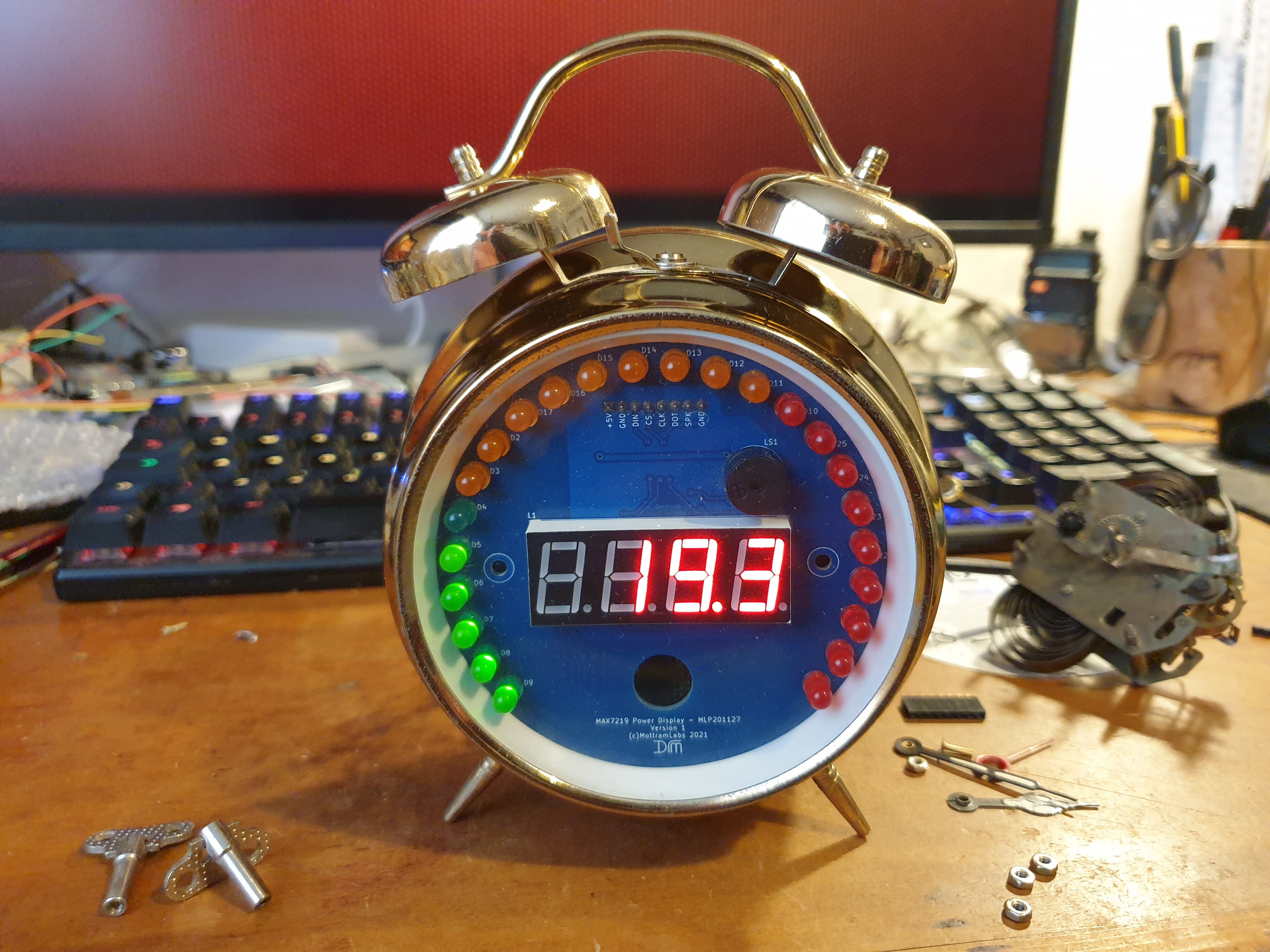
Finally I housed this in an old alarm clock, and it fit like a glove! Like it was just meant to be! Now all I need to do is make some nice front/sticker for the clock to hide the bits of the PCB I don't need to see and maybe get the bells ringing for an alarm condition.
Archived from radmon.org - originally posted 20/12/2021
Add Comment
This policy contains information about your privacy. By posting, you are declaring that you understand this policy:
- Your name, rating, website address, town, country, state and comment will be publicly displayed if entered.
- Aside from the data entered into these form fields, other stored data about your comment will include:
- Your IP address (not displayed)
- The time/date of your submission (displayed)
- Your email address will not be shared. It is collected for only two reasons:
- Administrative purposes, should a need to contact you arise.
- To inform you of new comments, should you subscribe to receive notifications.
- A cookie may be set on your computer. This is used to remember your inputs. It will expire by itself.
This policy is subject to change at any time and without notice.
These terms and conditions contain rules about posting comments. By submitting a comment, you agree with these rules:
- Although the administrator will attempt to moderate comments, not all comments can be moderated at all times.
- You acknowledge that all comments express the opinions of the original author and not those of the administrator.
- You will not post material which is knowingly false, obscene, hateful, threatening, harassing or invasive of privacy.
- The administrator has the right to edit, move or remove any comment for any reason and without notice.
Failure to comply with these rules may result in being banned from submitting further comments.
These terms and conditions are subject to change at any time and without notice.
Comments