
- Posted on
- • Other Electronics
MQTT receiver for die hard Radlog Pro users
- Author
-
-

- User
- Mr Blinky
- Posts by this author
- Posts by this author
-
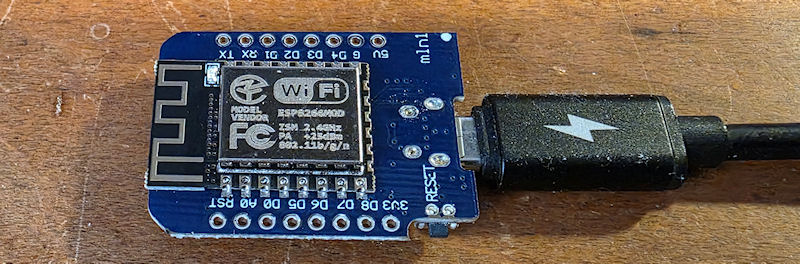
If you have ever used Radlog Pro from radmon.org, you will know that the only way to get the counts into it is via serial. This is generally fine if your counter sits near the PC Radlog Pro is running on, but if not it can be a challenge. Simply making a long serial cable works providing you can route the cable. The other method is wirelessly.
I used to use a wireless TTL serial transmitter and receiver. It worked for the most part, but the signal was always an issue. Even receiving the signal in direct line of sight, through glass was a challenge for these little units. After servicing my outdoor monitoring Geiger counter (Radspod One) I ditched the wireless serial comms and fitted a Wemos D1 Mini running ESPGeiger firmware. This meant I could take advantage of MQTT and I built a little receiver to receive the CPM from this counter over MQTT, then send it to Radlog Pro via serial.
I wrote Grok wrote me a small Arduino sketch for receiving the CPM from an ESPGeiger and sending it to the serial port on a PC/server. This can be used to get the CPM from any ESPGeiger sending to a MQTT server, or modified for any counter using MQTT. It's just a case of change the details to suit your own WiFi/MQTT server etc and the topic, load onto a Wemos D1 Mini, or other flavour of ESP8266 (with serial connection), and plug it into whatever PC/server you are running Radlog Pro on. Set Radlog to use the com port of the Wemos and baud to 9600. The code sends the CPM to Radlog every 5 seconds, however the default in ESPGeiger firmware settings is 60 seconds. I changed ESPGeiger to send to MQTT every 5 seconds and this made Radlog a little livelier, and a higher resolution for HA too.
Here is the code. Change the settings to suit and upload on an ESP8266. Plug in and go. This was updated on 10/05/2026 as the original code used a depreciated method - Many thanks to steadramon for pointing this out. This code now uses the proper JSON method.
#include <ESP8266WiFi.h>
#include <PubSubClient.h> // (by Nick O'Leary)
#include <ArduinoJson.h> // (by Benoit Blanchon)

const char* ssid = "your_wifi_ssid";
const char* password = "your_wifi_password";
const char* mqtt_server = "your_mqtt_broker_ip";   // Home Assistant / MQTT broker IP
const int   mqtt_port = 1883;
const char* mqtt_user = "optional";      // Leave empty if no auth
const char* mqtt_pass = "optional";

const char* jsonTopic = "ESPGeiger-######/tele/sensor"; // JSON topic is ESPGeiger-{id}/tele/sensor. Adjust the id for your own counter

WiFiClient espClient;
PubSubClient client(espClient);

String latestCPM = "0";

void setup() {
  Serial.begin(9600);           // RadLog Pro usually expects 9600 baud
  delay(100);

  WiFi.begin(ssid, password);
  while (WiFi.status() != WL_CONNECTED) {
    delay(500);
    Serial.print(".");
  }
  Serial.println("\nWiFi connected");

  client.setServer(mqtt_server, mqtt_port);
  client.setCallback(callback);
}

void callback(char* topic, byte* payload, unsigned int length) {
  // Parse JSON
  StaticJsonDocument<256> doc;   // Should be plenty for this payload
  DeserializationError error = deserializeJson(doc, payload, length);

  if (error) {
    Serial.print("JSON parse failed: ");
    Serial.println(error.c_str());
    return;
  }

  // Extract cpm value
  if (doc.containsKey("cpm")) {
    float cpm = doc["cpm"];
    latestCPM = String(cpm, 2);   // Keep 2 decimal places like the firmware
    // Serial.print("Updated CPM: "); Serial.println(latestCPM); // Debug
  }
}

void reconnect() {
  while (!client.connected()) {
    String clientId = "WemosGeigerBridge-" + String(random(0xffff), HEX);
    if (client.connect(clientId.c_str(), mqtt_user, mqtt_pass)) {
      client.subscribe(jsonTopic);
      Serial.println("MQTT connected & subscribed");
    } else {
      delay(2000);
    }
  }
}

void loop() {
  if (!client.connected()) {
    reconnect();
  }
  client.loop();

  // Send latest CPM to PC periodically
  static unsigned long lastSend = 0;
  if (millis() - lastSend > 5000) {        // Every 5 seconds - adjust as needed
    if (latestCPM != "0") {
      // Simple number (works for many programs)
      Serial.println(latestCPM);

      // Uncomment one of these alternatives if RadLog needs a specific format:

      // MightyOhm-style CSV example:
      // Serial.print("CPS, 0, CPM, ");
      // Serial.print(latestCPM);
      // Serial.println(", uSv/hr, 0.00");

      // Or plain labeled:
      // Serial.print("CPM: ");
      // Serial.println(latestCPM);
    }
    lastSend = millis();
  }
}
Long live Radlog Pro! 😄
Add Comment
This policy contains information about your privacy. By posting, you are declaring that you understand this policy:
- Your name, rating, website address, town, country, state and comment will be publicly displayed if entered.
- Aside from the data entered into these form fields, other stored data about your comment will include:
- Your IP address (not displayed)
- The time/date of your submission (displayed)
- Your email address will not be shared. It is collected for only two reasons:
- Administrative purposes, should a need to contact you arise.
- To inform you of new comments, should you subscribe to receive notifications.
- A cookie may be set on your computer. This is used to remember your inputs. It will expire by itself.
This policy is subject to change at any time and without notice.
These terms and conditions contain rules about posting comments. By submitting a comment, you agree with these rules:
- Although the administrator will attempt to moderate comments, not all comments can be moderated at all times.
- You acknowledge that all comments express the opinions of the original author and not those of the administrator.
- You will not post material which is knowingly false, obscene, hateful, threatening, harassing or invasive of privacy.
- The administrator has the right to edit, move or remove any comment for any reason and without notice.
Failure to comply with these rules may result in being banned from submitting further comments.
These terms and conditions are subject to change at any time and without notice.
Comments